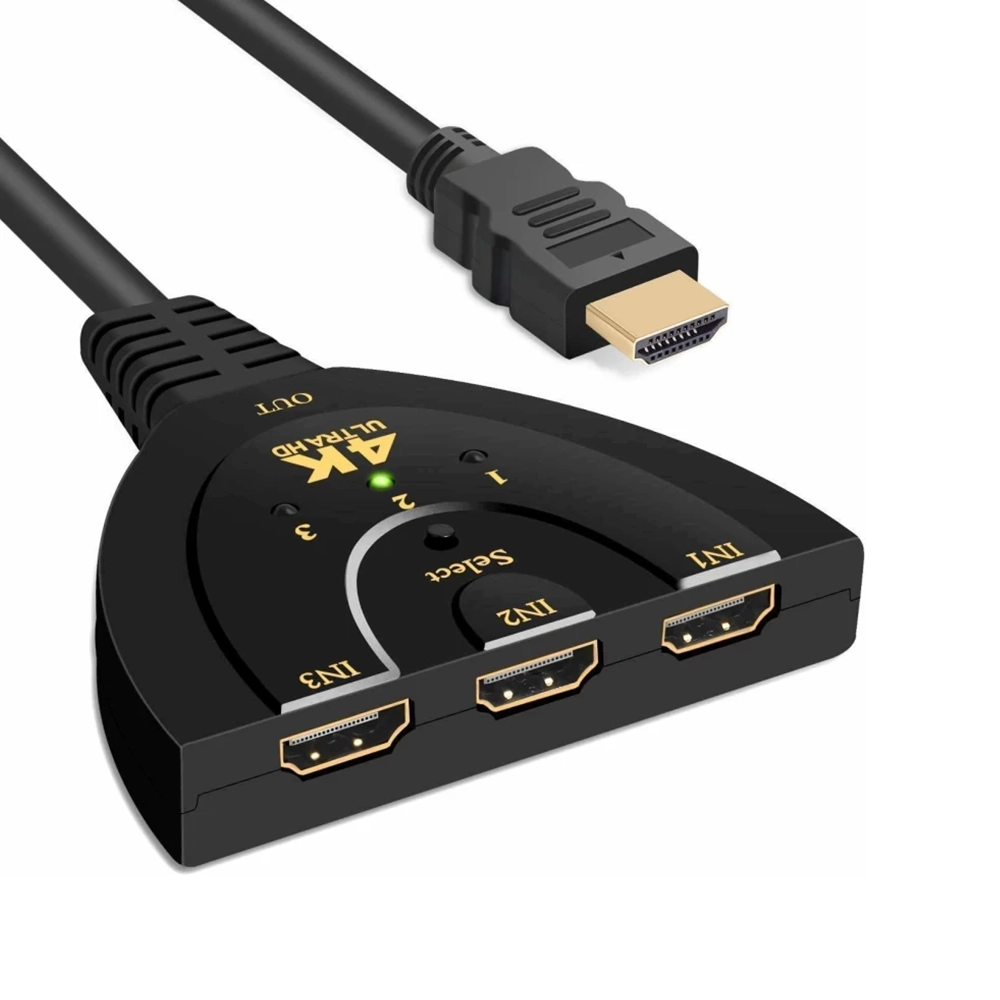
3 in 1 HDMI Input 4K x 2K HDTV Pigtail Switch Adapter

£4.50 Ex VAT

Out of stock

Out of stock

14 People watching this product now!
  • delivery-car Courier delivery

Our courier will deliver to the specified address

Next Day

7.33

  • dhl-logo DHL Courier delivery

DHL courier will deliver to the specified address

Next Day

7.33

Payment Methods:

payment-gateway

Description

The 3 in 1 HDMI Input 4K x 2K HDTV Pigtail Switch Adapter is a versatile device that allows you to connect up to three HDMI sources to one display. With support for high resolutions and easy switching, it’s ideal for home theaters, gaming setups, and more.

Key Features:

  • Triple Input Capability: Lets you connect three HDMI sources and switch between them.

  • 4K × 2K Support: Compatible with up to 4K resolution for sharp visuals.

  • Deep Color Support: Supports up to 12-bit color depth.

  • Compact Pigtail Design: Integrated cable design for minimal clutter.

  • Plug & Play: No driver installation needed; just connect and use.

  • Manual Switching: Simple button press to change source.

Specifications:

  • Standard: HDMI 1.3b (or compatible)

  • Max Video Resolution: Up to 4K × 2K (3840 × 2160)

  • Color Depth: 12-bit deep color support

  • Data Rate: Up to 2.5 Gbps per channel (approx)

  • Connections: 3 HDMI inputs, 1 HDMI output

  • Condition: Brand new

  • Cable Type: Pigtail integrated HDMI cable

Package Includes:

  • 1 × 3 in 1 HDMI Input 4K x 2K HDTV Pigtail Switch Adapter

  • 1 × User manual / instruction guide

Installation Instructions:

  1. Power Off Devices: Turn off the TV / display and source devices before connecting.

  2. Connect HDMI Sources: Plug up to three HDMI source devices (e.g. set-top box, console, Blu-ray) into the adapter’s input ports.

  3. Connect to Display: Plug the adapter’s output into your HDTV or monitor’s HDMI input.

  4. Switch Input: Press the manual switch button on the adapter to choose which HDMI source will show.

  5. Verify Output: Check that your display receives the selected input and shows correct resolution.

  6. Reposition if Needed: Adjust cable layout for neatness and performance.